Building Blocks
todo
The idea behind separating building management requires to understand which components need to work together in order
to fulfill SCPs job.
Let's imagine you're creating a brand new e-mail within SCP:
- The user creates a new material by entering some Meta Data and selecting
a Material Type from a list
- SCP will spin up the Content App which is linked to the Material Type inside the Content Area to enable
the user managing the content of the given Material Type
- The user might add some content and also use some External Content Services to select for instance images from
any other source (like Giffy etc.).
- Once the user has finished editing the content he might move it over to a status where a Job picks up the material
and generates the real content with using the defined Build Service for the Material.
As you can see, there are quite a few services involved when it comes to content creation. We will go through every detail
within this guide.
Content Apps
SCP offers different kinds of Content Apps which have different use cases and feature sets:
Briefing Forms Feature
The Briefing Forms Feature enables Developers to create interactive web forms which offer WYSIWYG functionality
with just a few lines of HTML. No JavaScript required from your side – could be ready in no-time.
It is production ready fast and therefore the right choice for creating simple Content Types (like E-Mails or Partials).
SCP Content Application
A SCP Content Application is a stand-alone web-application which is seamlessly integrated into the Platform.
As Developers are free to build on any tech-stack with any kind of technology under the hood, there is practical no
limitation.
SCP offers a great Content App SDK which is based on modern JavaScript and can be registered by just including a
script tag to the html the content app provides.
External Applications
If you want to build a super rich web portal Showcase Platform is not enough – you need a specialized tool which
handles all the underlying processes along with the given content, moderators, asset libraries etc.
Showcase Platform might keep a pointer to resources built by those applications (like articles, events, etc.) but
don't offer any kind of content editing features – it might connect different applications to keep them up to date which
could be beneficial for the SCP user.
Hosting of Content Apps
You can host your Content App on any kind of webserver, as long as it supports a SSL secured connection.
A thumbnail.png file has to be placed inside the apps root directory to help the user to find the right Content
App. That is basically it – all the details are configurable inside the Material Type.
Material Types
Content Apps are attached to Material Types, which you can then use to create a new Material with.
Therefore, after creating a definition for a Material Type you need to import its configuration
so that you then are able to use your Content App within SCP.
Importing Configurations
If you’re having SCP running locally, you need to import the configuration by
running the proper CLI Command.
Once you pushed your changes to the Client configuration's repository,
we’re taking care of the config to be imported.
When working with multiple Material Types and multiple e.g . OPUs, you will fastly notice
that the amount is getting too big to easily handle them within the Front End at one glance.
For this we are also having two options for you in store, to make your live and that of your
Client's users way easier.
Before that let us take a quick look at how to create a Material Type,
which is defined within the Client's configurations:
Create A New Material Type
todo
As you can see from the example above, we create a new Material Type which has the label Fancy Instant Message.
The label will be shown within almost everywhere you can select the Material Type
and it will always play an important part when creating/copying a Material.
It is placed within the group MaterialType::MATERIAL_GROUP_INSTANT_MSG which stands for Instant Message,
to help the user choosing the right Material Type.
We have recently implemented several harmonization approaches in creating new
and organizing old Material Type definitions, to make it easier for everyone to align on certain defaults.
More about that a bit further down below.
So, the Content App located at https://my-website.com/fancy-instant-message/ will be loaded and filled by
SCP on start up/init of the Material, with your Client's default data,
that are stored in your defined Database, given you set something up (e.g. via App Configurations).
Summarization Of The Behaviour:
Welcoming Grouping
todo
Based on the example configuration (still above), you might be able to spot our grouping possibilities already.
We have currently implemented two incrementally usable ways to make it easier to handle multiple
Material Types, namely the group and the channel definitions.
Gather Requirements First
Try to understand your client's needs before you start configuring your SCP instance.
It can become very stressful to change the foundation once you perceive that the overall structure did not
fit the Client's needs, as with everything in Application Engineering/Development .
Material Channels
todo
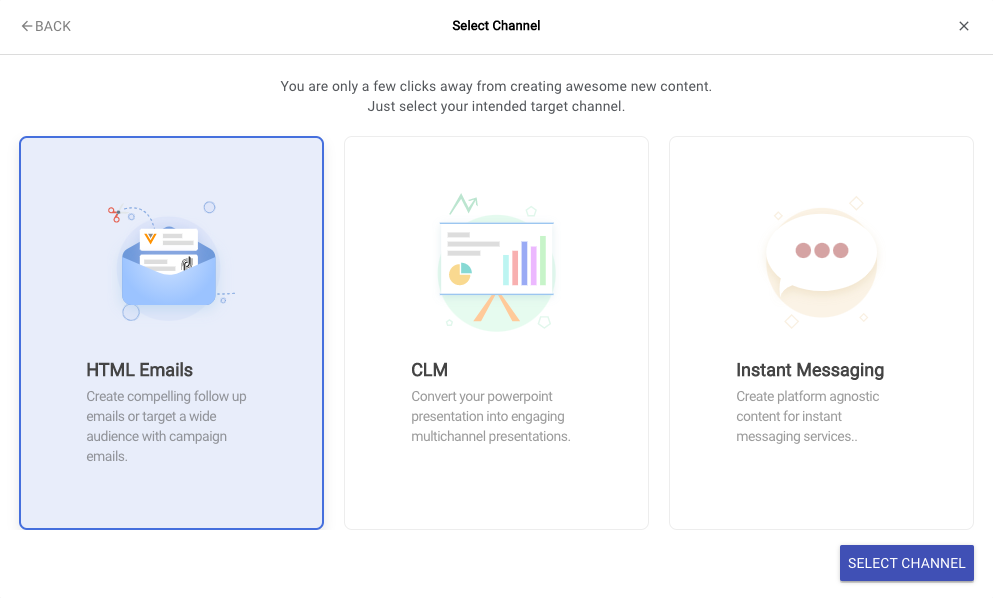
As an addition to the Material Type Grouping that will be discussed afterwards,
defining differing Material Channels will come in as the first handy thing to manage Material Types
in the Front End.
With this, you can already make a pre-selection available to every User, by utilizing every Material Type's channel key definition.
Basically, if you define more than one Material Channel on all of your Material Types
you will then have the following selection available in the Front End, to funnel the User's movement.
These are the Material Channel definitions we are currently enabling you to use:
| Constant | Value |
|---|
| MATERIAL_CHANNEL_MISC | misc |
| MATERIAL_CHANNEL_EMAIL_HTML | email_template_fragments |
| MATERIAL_CHANNEL_CLM_PPTX | clm_presentations |
| MATERIAL_CHANNEL_INSTANT_MSG | instant_messaging |
Material Type Groups
todo
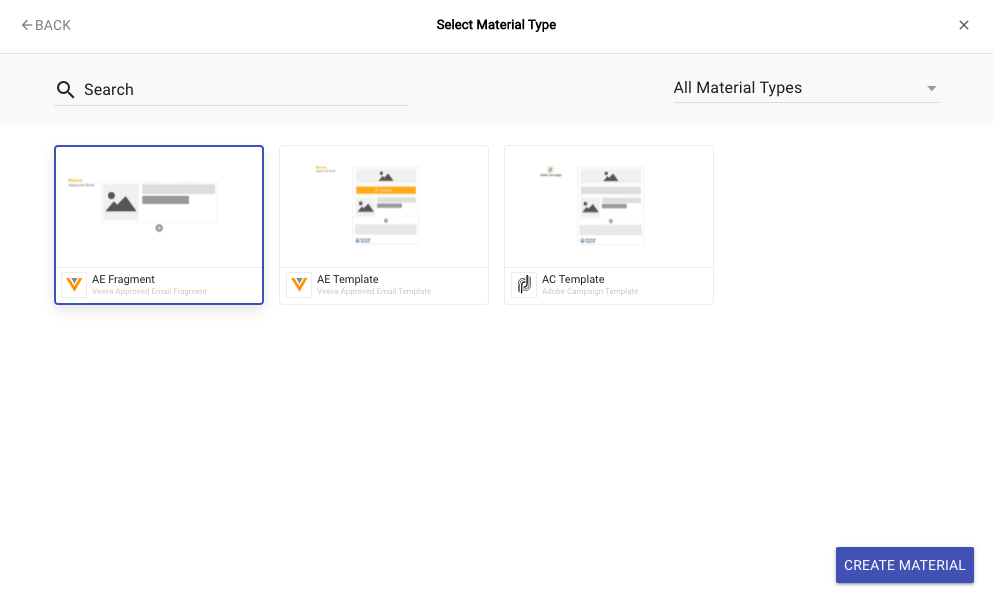
So, Material Types Groups group Material Types together and here are
a few good examples for Material Types Groups:
- E-Mail Templates
- for blast systems
- for Veeva Vault®
- ...
- Landing Pages
- Google AMP
- Static Page
- ...
- eDetailers
- ...
- Leaflet
- ...
Material Group Types are defined via the type.group key of every
Material Type definition.
As you can see, you can create multiple Material Types, like for blast systems and for Veeva Vault®
which essentially are both E-Mail Templates.
You also just might use differing Content Apps, which therefore differ in their workflows -
or even just differing startup settings.
It is really a matter of how you structure your Client's demands before you start to create Material Types.
This way everyone will also have an easier time in the GUI of SCP, to narrow their selection results down.
Afterthoughts
You have created your first Material Type which points to your (presumably empty) content application.
You now have to choose if you want to go with the Briefing Forms Feature or
if you would like to create your Content App with full flexibility.
We recommend starting with a simple form which leverages the Briefing Form Capabilities,
as it is a good entry point to learn and test how SCP works,
before moving on to more advanced customized approaches.
