
# Notifications
todo
SCP can send emails (and more in the future) to its users whenever necessary. It has a powerful templating system which can be completely customized to your needs.
Lets imagine the following use-case:
Boss: Let's send an email to the owner of a Material when it reaches the approval step.
This request requires you to:
- Create a template with the content of the (E-Mail-)Notification
- Create an action which actually queues the email
So lets move on...
# Templates
todo
Laravel Documentation
Do not use excess indentation when writing Markdown emails. Per Markdown standards, Markdown parsers will render indented content as code blocks (source: https://laravel.com/docs/8.x/mail).
# System Notifications
Simple templates for system notifications, e.g. for errors, user activation, expiry of user password.
@section('subject')
    Material {{ $model->name }} has become available for review
@endsection

@section('body')
    Dear User,

    {{ $model->user()->full_name }} just created a new account in Canvas and it’s waiting for your approval to access the tool.
    To do so just click on the link below.

    Kind regards.
@endsection

@section('action')
    Approve or Reject User
@endsection
# Custom Template Using Component
For more complex and custom notifications, we use built-in components message, panel, table, promotion, button and also we can create custom ones e.g. renditions-table.
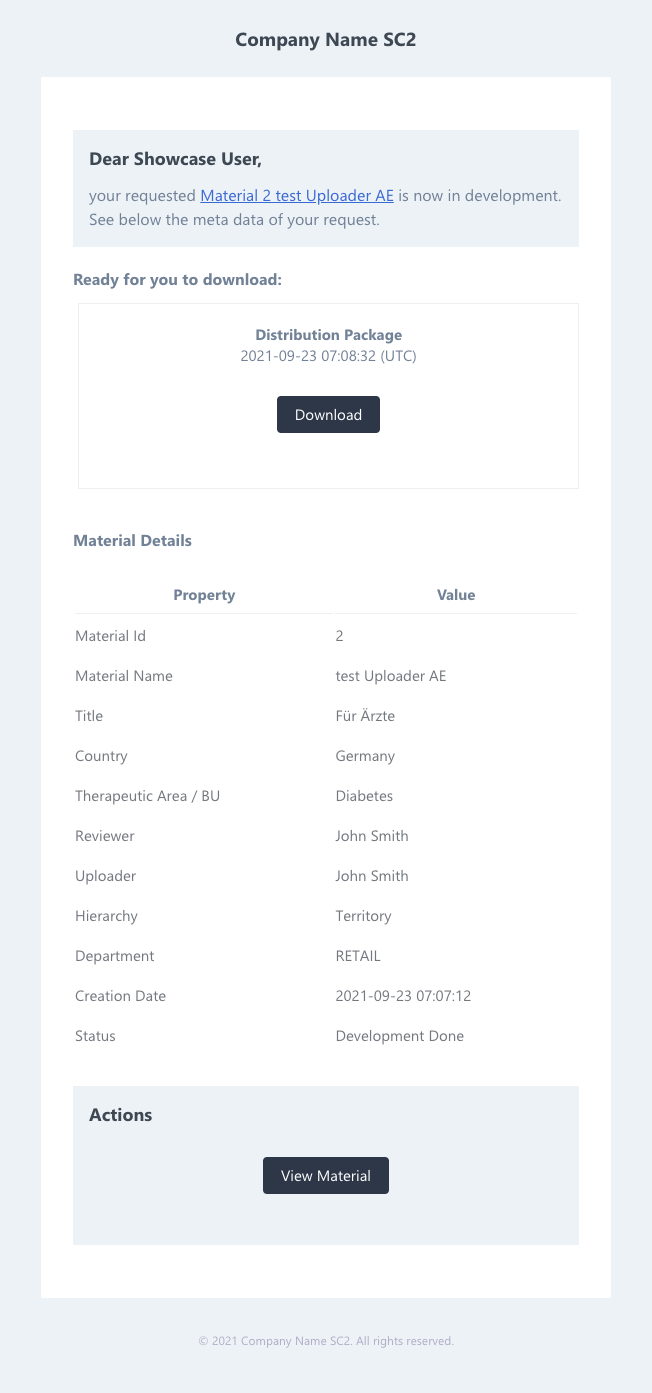
std-deployment-notification
Example of a layout template for std-deployment-notification (see below Layouts point 3).
@php
    $service = app()->make('App\Services\FieldSetupService');
@endphp

@component('mail::message')

@component('mail::panel')
# Dear Showcase User,
your requested [Material {{$material->id}} {{$material->name}}]({{ config('app.frontendUrl') . '#/library/materials/' . $material->id . '/view?f[id]=' . $material->id }}) is now live.
@endcomponent

@if ($renditions)
## Ready for you to download:
@component('emails/components/renditions-table', ['renditions' => $renditions])
@endcomponent
@endif

## Material Details
@component('mail::table')

| Property      | Value          |
| ------------- | -------------- |
@foreach ($material->getFields() as $field)
@if ($field->hasValue() && in_array($field->getFieldName(), WHITELIST_EMAIL_KEYS))
| {{$field->getLabel()}} | {{ is_array($field->getValue()) ? implode(', ', $field->getValue()) : $field->getValueLabel() }} |
@endif
@endforeach

@endcomponent

@component('mail::promotion')
# Actions

@component('mail::button', ['url' => config('app.frontendUrl') . '#/library/materials/' . $material->id . '/view?f[id]=' . $material->id, 'color' => 'blue'])
View Material
@endcomponent

@endcomponent

@endcomponent
# Custom Template With PopUp Message
Message created when changing the status for a material and is forwarded to the material creator.
@component('mail::message')

## Personal Message
{{$message}}

@endcomponent
# Localization
todo
- In SCP the default templates are located in the
defaultsdirectory:- /api/resources/views/emails/defaults/*.blade.php
- Customised templates which are prepared for clients can be found in the specific folder:
- CLIENT_CONFIG/storage/mails/*.blade.php
Check out the CLIENT_CONFIG for details
# Basic Templates
todo
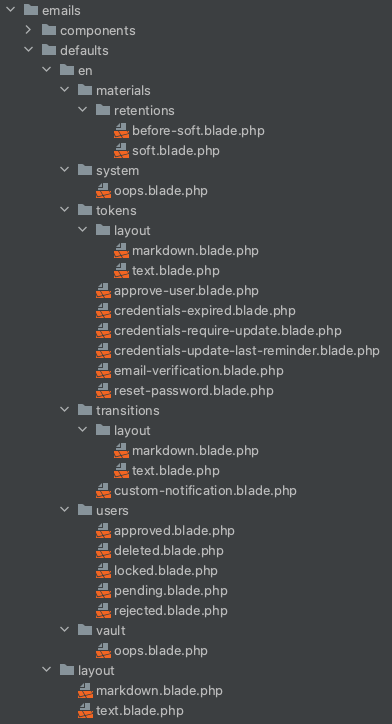
The basic templates can be found here /api/resources/views/emails/defaults/. The en directory contains all the basic templates used by SC2 in English by usage (each section has its own directory materials, system, tokens, transitions, users, vault).
# Overriding Basic Templates
todo
The basic templates are overwritten in the directory of the specific client CLIENT_CONFIG/storage/mails/. To overwrite the basic templates, it is necessary to create an exact directory structure of files (which we want to overwrite) and directories as in the /api/resources/views/emails/defaults/ directory.
Recommended approach
It is best to copy the necessary E-mail templates from the defaults directory and make the customisation.
Check out the CLIENT_CONFIG for details
# Overriding PopUp Message
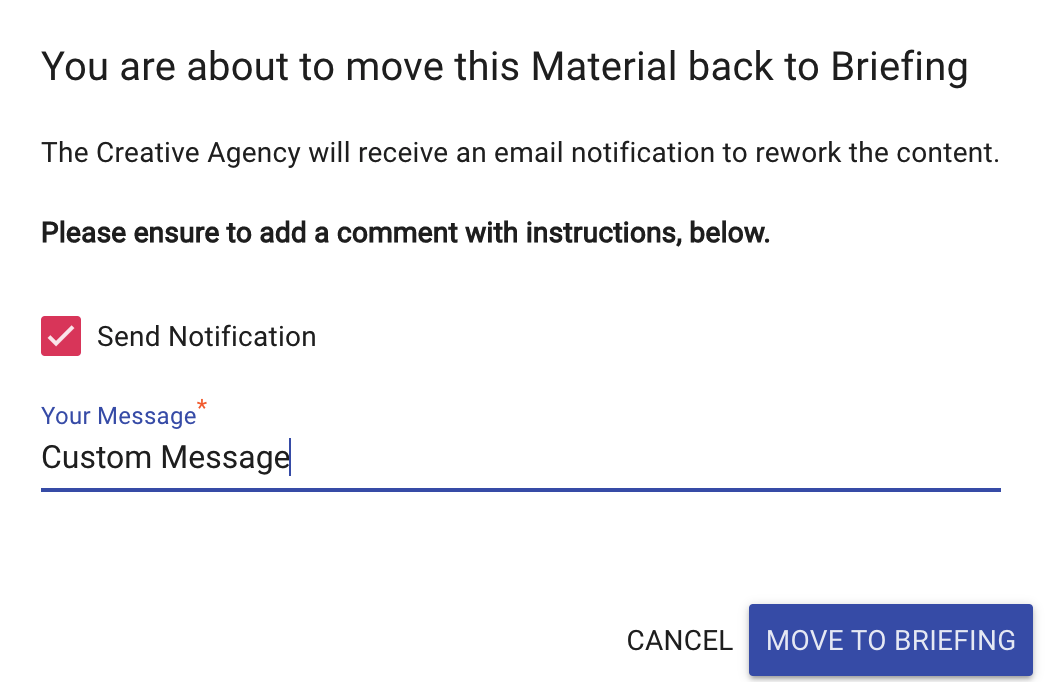
Starting Popup notification
To start PopUp notifications, add notify to the appropriate transition in the file CLIENT_CONFIG/config/transitions.php.
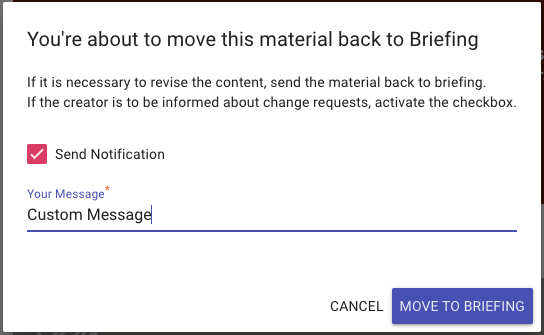
In the PopUp notification template, only the message text can be changed. The content of the message is changed in the CLIENT_CONFIG/config/transitions.php.
// CLIENT_CONFIG/config/transitions.php

'tr_admin_to_briefing' => [
        'actionLabel' => 'Move to Briefing',
        'headline' => "You're about to move this material back to Briefing",
        'description' => 'If it is necessary to revise the content, send the material back to briefing.<br>If the creator is to be informed about change requests, activate the checkbox.',
        'buttonLabel' => 'Move to Briefing',
        'successMessage' => 'The Material is now in Briefing Mode',
        'filter' => [],
        // addition of the PopUp notifications
        'notify' => [
            'subject' => function (\App\Models\Material $material) {
                return "Material $material->name ($material->id) requires your attention";
            },
            'required' => false
        ],
        'conditions' => [],
        'updates' => [
            'status' => 'briefing'
        ]
    ],
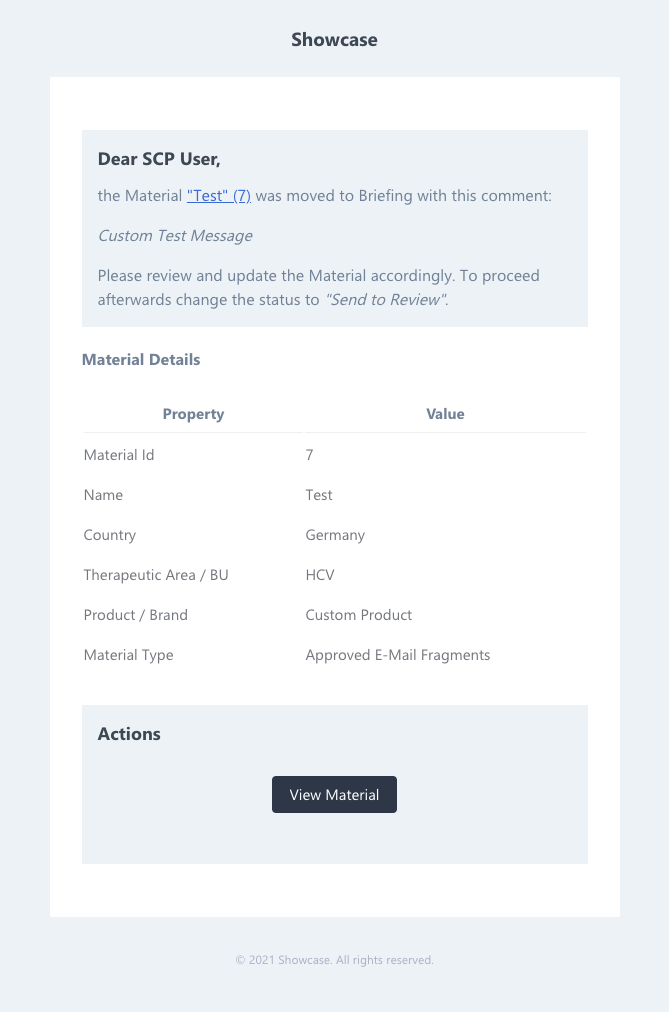
The content of the notification will be as followed.
Check out the CLIENT_CONFIG for details
# Multi-language Template
todo
We can create multi-language templates for a specific client CLIENT_CONFIG/storage/mails/. It is recommend creating a directory for each language separately e.g. en, de etc.
Check out the CLIENT_CONFIG for details
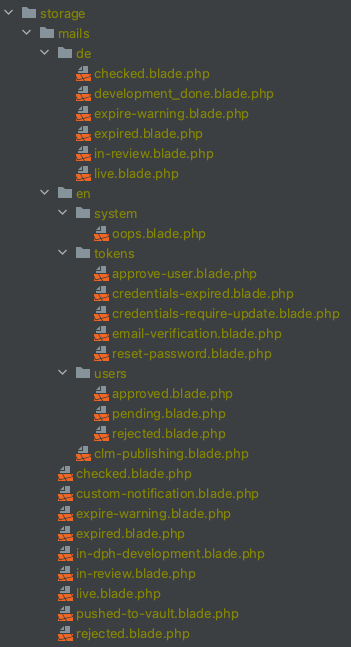
The selection of the language is defined in the file email-notifications.php, which is located in the client directory CLIENT_CONFIG/config/actions/. In this case, if OPU Germany is selected, the templates will be fetched from the de directory.
Check out the CLIENT_CONFIG for details
<?php

// CLIENT_CONFIG/config/actions/email_notifications.php

use App\Jobs\JobChain;
use App\Jobs\Notifications\SendEmailJob;
use App\Models\MaterialRendition;
use App\Models\Material;
use Config\Action;

Action::create()

    // this filter needs to match
    ->filtersBy([
        'status' => ['showcase_review'],
    ])

    // add a function here
    ->runs(function (Material $material) {
        JobChain::collect();

        $job = SendEmailJob::create()->withModel($material);

        // fetch the directory with the basic templates for a specific client
        $template = 'emails.clients.' . config('sc2.clientName') . '.';

        //get the status of the material
        $statusField = $material->getField('status');
        $status = $statusField->getValue();
        $statusLabel = $statusField->getValueLabel();

        if ($status === 'showcase_review') {
            // set the default notification subject
            $job->subject("Material \"{$material->name}\" ({$material->id}) is now in status: {$statusLabel}");
        }

        if ($material->getField('opu')->getValue() === 'germany') {
            // set the notification subject depending on the OPU
            $template .= 'de.';
            $job->subject("Material \"{$material->name}\" ({$material->id}) befindet sich nun im Status: {$statusLabel}");
        }

        if ($status === 'showcase_review') {
            // get a specific template depending on the status of the material
            $job->template($template . 'in-review');
        }

        if ($material->status_id === 'showcase_review') {
            // get a specific rendition
            $job->rendition(MaterialRendition::RENDITION_BRIEFING_PDF);
        }

        JobChain::dispatchCollected();
    });
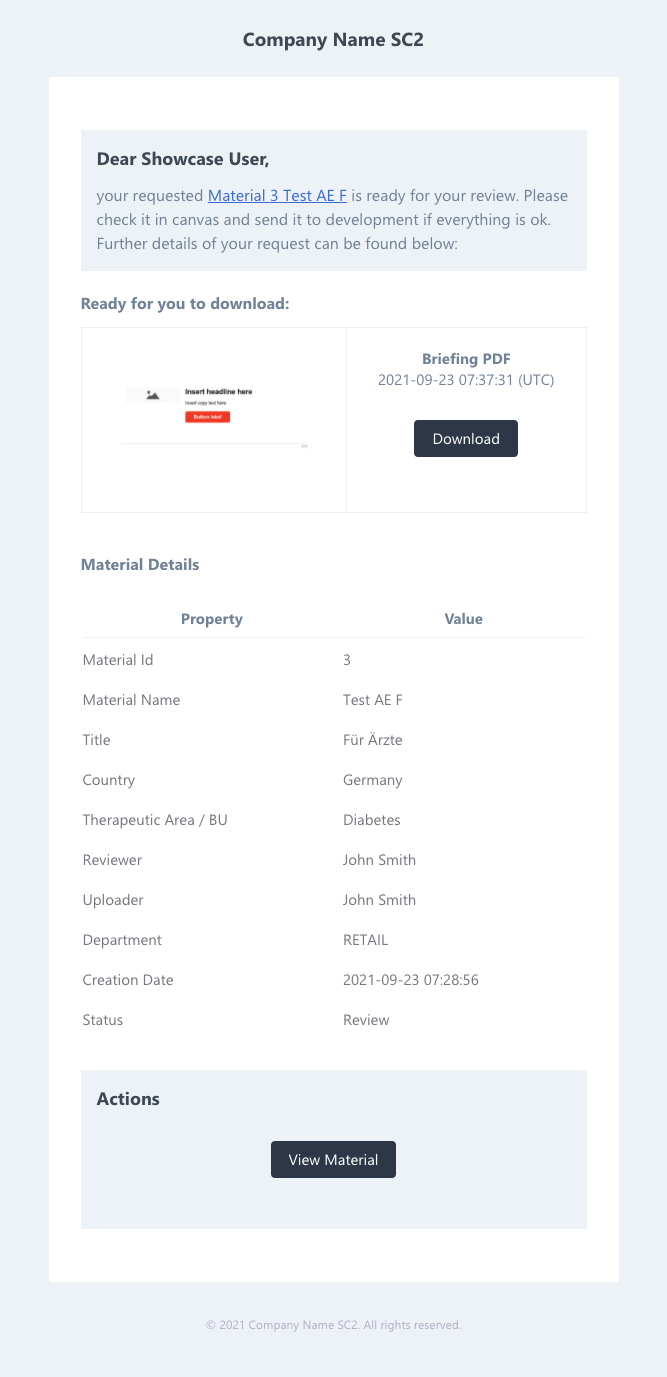
Example of E-mail notification template for material in showcase_review status (path CLIENT_CONFIG/storage/mails/de/in-review.blade.php).
Check out the CLIENT_CONFIG for details
@php
    $service = app()->make('App\Services\FieldSetupService');
    $material_link = config('app.frontendUrl') . '/#/library/materials/' . $material->id . '/view?f[id]=' . $material->id;
@endphp


@component('mail::message')
@component('mail::panel')
# Sehr geehrter Canvas User,
bitte prüfen Sie das Briefing und die Metadaten von [Material {{$material->id}} {{$material->name}}]({{ $material_link }}) . Bitte senden Sie es anschließend in die Entwicklung. Bitte beachten Sie auch das angehangene Briefing PDF und die Metadaten unterhalb.
@endcomponent

## Material Details
@component('mail::table')
| Property      | Value          |
| ------------- | -------------- |
@foreach ($material->getFields() as $field)
@if ($field->hasValue() && in_array($field->getFieldName(), WHITELIST_EMAIL_KEYS))
| {{$field->getLabel()}} | {{ is_array($field->getValue()) ? implode(', ', $field->getValue()) : $field->getValueLabel() }} |
@endif
@endforeach

@endcomponent

@component('mail::promotion')
# Actions
@component('mail::button', ['url' => $material_link, 'color' => 'blue'])
View Material
@endcomponent
@endcomponent
@endcomponent
# Custom Components
todo
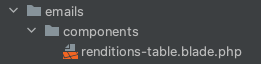
Custom components can be used in all templates. The component is placed in the directory api/resources/views/emails/components/. Below is an example of a custom component named renditions-table.
Source code of the component:
// api/resources/views/emails/components/renditions-table.blade.php

<table style="width: 100%; border-collapse: collapse; margin-bottom: 40px;">
    @foreach ($renditions as $rendition)
        <tr>
            @if ($rendition['thumb'])
                <td style="text-align: center; border: 1px solid #edeff2; padding: 20px;">
                    <img src="{{ $rendition['thumb'] }}" alt="{{ $rendition['name'] }}" width="200">
                </td>
            @else
                <td></td>
            @endif
            <td style="text-align: center; border: 1px solid #edeff2; padding: 20px;">
                <b>{{ $rendition['name'] }}</b> <br>
                {{ $rendition['created']->toDateTimeString() }} (UTC)<br>
                @component('mail::button', ['url' => $rendition['url'], 'color' => 'blue'])
                    Download
                @endcomponent
            </td>
        </tr>
    @endforeach
</table>
The custom component can be used in E-mail notification templates for a specific client CLIENT_CONFIG/storage/mails/. Example of using the custom component in the E-mail notification template custom-notification.
// CLIENT_CONFIG/storage/mails/custom-notification.blade.php

@if ($renditions)
## Ready for you to download:
@component('emails/components/renditions-table', ['renditions' => $renditions])
@endcomponent
@endif
Check out the CLIENT_CONFIG for details
# Type
todo
| Name / Type | Characteristics | Function |
|---|---|---|
opt-Basic-notification | - contains a checkbox to enable/disable - notification is send to creator - custom text can be entered | notify function |
std-briefing-notification | - contains Download Link to Briefing PDF - contains Link to the Material - receiver can be customized (TA or Brand Specific and/or selectable via Property) | |
std-deployment-notification | - contains Download Link to Deployment Package - receiver can be customized | |
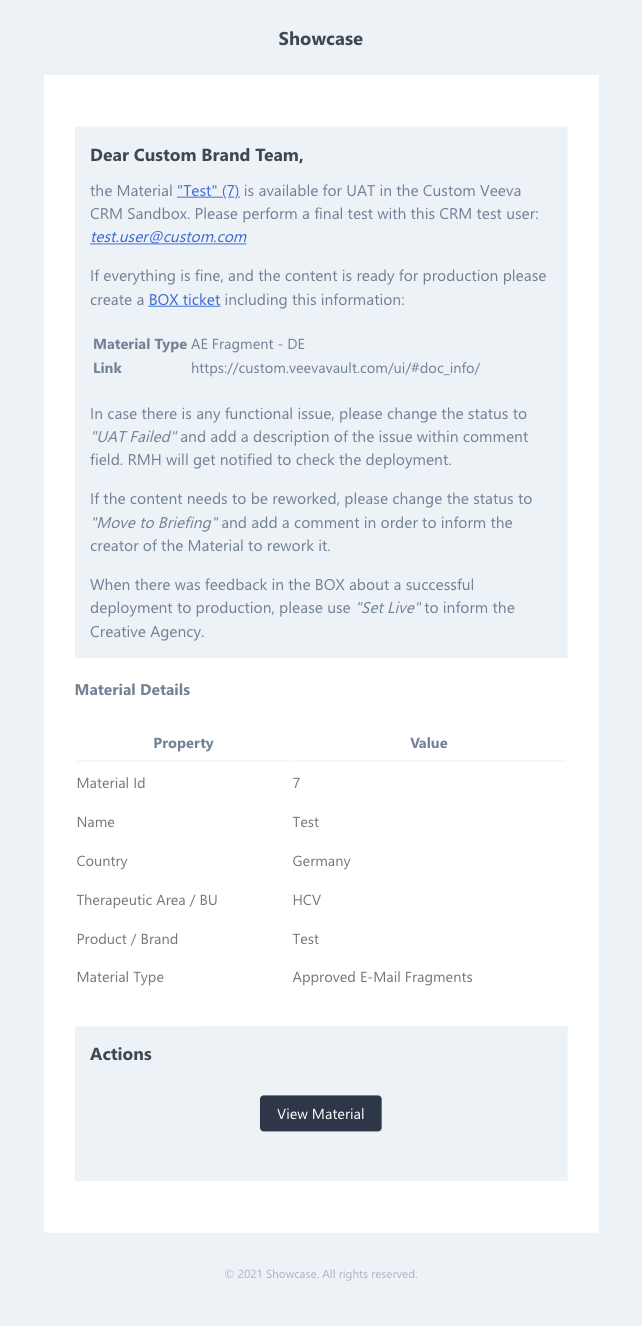
std-UAT-notification | - contains instructions to perfom UAT in Veeva Vault - contains Test User to login with - contains Vault Link - contains Link to showcase material - contains basic Material Information (ID, Country BU) - receiver can be customized |
# Layouts
todo
# opt-Basic-notification
# PopUp Message
# E-Mail Message
# std-briefing-notification (E-Mail Message)
# std-deployment-notification (E-Mail Message)
# std-UAT-notification (E-Mail Message)
# Actions
todo
# PopUp
The content of the message to the creator of the material is entered in a pop-up window when changing the status. The action is set for the specific transition. Detailed description of the option transition notify.
<?php

// CLIENT_CONFIG/config/transitions.php

return [
    'transition_name' => [
        'notify' => [
            'subject' => function (\App\Models\Material $material) {
                return "Material $material->name ($material->id) requires your attention";
            },
            // template stored in CLIENT_CONFIG/storage/mails/custom-notification.blade.php
            'template' => 'custom-notification',
            'required' => false
        ]
    ]
];
Actions are created in any file within the config/* structure inside the CLIENT_CONFIG.
Different approaches
There are currently two approaches. It is recommended to use the JobChain and a simplified way of handling templates depending on OPU's and material status.
- New approach (recommended)
<?php

// CLIENT_CONFIG/config/actions/email_notifications.php

use App\Jobs\JobChain;
use App\Jobs\Notifications\SendEmailJob;
use App\Models\MaterialRendition;
use App\Models\Material;
use Config\Action;

Action::create()

    // this filter needs to match
    ->filtersBy([
        'status' => ['showcase_review'],
    ])

    // add a function here
    ->runs(function (Material $material) {
        JobChain::collect();

        $job = SendEmailJob::create()->withModel($material);

        // fetch the directory with the basic templates for a specific client
        $template = 'emails.clients.' . config('sc2.clientName') . '.';

        //get the status of the material
        $statusField = $material->getField('status');
        $status = $statusField->getValue();
        $statusLabel = $statusField->getValueLabel();

        if ($status === 'showcase_review') {
            // set the default notification subject
            $job->subject("Material \"{$material->name}\" ({$material->id}) is now in status: {$statusLabel}");
        }

        if ($material->getField('opu')->getValue() === 'germany') {
            // set the notification subject depending on the OPU
            $template .= 'de.';
            $job->subject("Material \"{$material->name}\" ({$material->id}) befindet sich nun im Status: {$statusLabel}");
        }

        if ($status === 'showcase_review') {
            // get a specific template depending on the status of the material
            $job->template($template . 'in-review');
        }

        if ($material->status_id === 'showcase_review') {
            // get a specific rendition
            $job->rendition(MaterialRendition::RENDITION_BRIEFING_PDF);
        }

        JobChain::dispatchCollected();
    });
- Old approach (not recommended)
<?php

// CLIENT_CONFIG/config/actions/emails.php

\Config\Action::create()
    // we check for changes on Material Elements
    ->on(\App\Models\Material::class)

    // this filter needs to match
    ->filtersBy([
        'status' => ['checked', 'live', 'review', 'expired'],
    ])

    // add a function here
    ->runs(function (\App\Models\Material $material) {
        /** @var \App\Jobs\Notifications\SendEmailJob */
        \App\Jobs\Notifications\SendEmailJob::create()
            ->withModel($material)
            ->dispatch();
    });
# Data Suppliers
todo
The default provider for E-Mails is EmailRecipientSupplier. With this class we can define the recipients of notifications. If you want to create a custom EmailRecipientSupplier, just create a class inside your /CLIENT_CONFIG/services/ folder. It needs to implements the OverridesServiceContract interface and extends the EmailRecipientSupplier class.
--> refer to advanced stuff
← States Renditions →