
# Translations
Currently available in BETA version, Material Content translation. Material Content is being translated using external DeepL (opens new window) translation service.
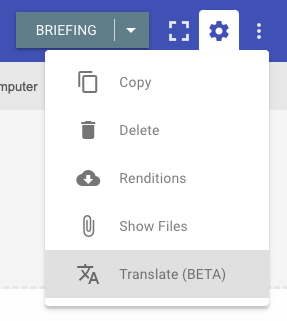
# Enabling
To enable Translate feature it needs to be enabled in Material Options, and also in Material Types. If both config values are set to true GUI will display a new option in action menu.
<?php

return [

    // config/material_options.php
    // ...
    [
        'filter'  => [
            'status' => 'briefing'
        ],
        'options' => [
            'briefingEditable'       => true,
            'propertiesEditable'     => true,
            'enableAutoTranslations' => true
        ]
    ],

    // config/material_types.php
    // ...
    'RMH-ae-template-flexi' => [
        'filter' => [],
        'type'   => [
            'fqn'                      => 'veeva.templates.flex',
            'supported_material_types' => [
                '*.templates.flex'
            ],
            'channel_icon'             => MaterialType::MATERIAL_ICON_VEEVA_EMAIL,
            'label'                    => 'Veeva Template',
            'group'                    => 'Approved E-Mail Templates',
            'template'                 => 'mail-flexi/ae-template-flexi/',
            'enable_auto_translations' => true
        ]
    ]

];
# Configuration
Translation is being done based on the Material Content keys (content.json). For every Material Type we can configure what content keys to translate or what content keys to skip using new configuration file material_translations.php.
<?php

// config/material_translations.php

return [

    [
        'filter'              => [
            'materialType' => 'RMH-ae-template-flexi'
        ],
        'includedContentKeys' => [
            '/element_text_\d+_content/',

            '/element_keymessage_\d+_content/',
            '/element_keymessage_\d+_button_\d+_label/',

            '/element_two_columns_\d+_left_copy/',
            '/element_two_columns_\d+_right_copy/',
            '/element_two_columns_\d+_left_button_label/',
            '/element_two_columns_\d+_right_button_label/',

            '/element_cta_\d+_button_label/',

            'nc_disclaimer'
        ],
        'ignoredContent'      => [
            // tokens
            '/{{.*?}}/'
        ],
        'enabled'             => true // enables current rule set
    ],

];
Translations config allows to determine what content keys will be translated using includedContentKeys option. Option is supporting regex and normal string as it can been seen in the example above.
If you need to define nested content keys, this is also possible using dotted structure 'foo.bar.baz' also supports regex.
It is also posible to ignore some content translation using ignoredContent, this is handy when you want to ignore content that should stay untouched like tokens.
| Option | Description | Required |
|---|---|---|
| filter | If rule set can be applied on current material | true |
| includedContentKeys | What keys from content.json should be included | true |
| ignoredContent | What content from content.json should be ignored | false |
| enabled | If current rule set is enabled | true |
← Renditions Modules →